A token catches your eye. Get the context before your next move.
Start with an address, a Trending alert or a question from your group. Soul connects discovery, token checks, monitoring and trading. Choose the guide for the question in front of you, then keep it beside the product.
Choose your next task
- Check a token: Start a scan in Scanner. Check the address, warnings, holders and trading activity.
- Find tokens to check: Browse Trending. Open an alert, read why the token appeared, then scan it.
- Browse feeds on the web: Use Terminal. Scroll a live feed, open a token, and read its scan and chart together.
- Trade a token: Use Sniper when you have decided to trade. Check the token, wallet, amount and order before confirming.
- Keep watching or ask for help: Set up Auto Track or Trench Track, discuss findings in Community, or contact support.
Use the docs alongside the product
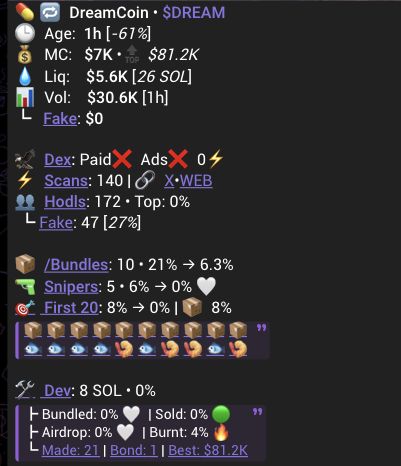
Open the product beside the guide. Follow the numbered steps and compare the button or field names with the example. Images show how to read the interface; example values are not live data. Open an image at full size when you need to inspect a field.
Scanner and Sniper are Telegram products. Terminal puts live Trending feeds, scans and charts in one web platform. Products and Features explains the boundaries. A scan, alert, ranking or positive security label does not make a token safe or guarantee an outcome.
When something does not match
Check the address, chain, selected view and timestamp first. Fields and controls can vary with source data and availability. Follow the recovery step on the guide you are using. If you are still stuck, contact support with the product name and the action you tried. Never share a private key or recovery phrase.
© 2023-Present Soul Systems LLC. All rights reserved.