Bundles shows groups of buys detected by the scanner. Read the reported buys and linked balances as separate numbers.
Start from a supported Solana scan and confirm the token address. Open Bundles
detail, or use /bundle <CA> or /bundles <CA> where supported.
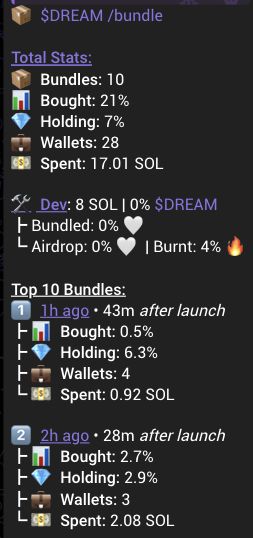
What the numbers measure
Each row shows an unchanged crop from Total Stats in the actual result above. The crop keeps the original icon, label and value. Select an image to enlarge it.
| Field and UI reference | What it measures |
|---|---|
Bundles |
Bundles: groups of buys detected by the scanner. One group can include several wallets. |
Bought |
Bought: tokens bought in those detected trades, shown as a share of the token supply used when the result was built. |
Wallets |
Wallets: distinct buyer addresses in the total. The same address can appear in more than one group row. |
Spent |
Spent: SOL spent on the reported buys, where this value is available. |
Holding |
Holding: recorded balances linked to buyers in these groups, shown as a share of the supply used for the result. |
In a scan, Bundle-attributed Holding is the same Holding field.
A transfer can link balances to both the sender and receiver. This means the linked balances can overlap; they are not a count of tokens held only by those buyers.
What the numbers cannot tell you
- Bought is not a current balance. It does not show how many of the bought tokens are still held.
- The gap between Bought and Holding does not show how much was sold. The two values use different records. Transfers, supply changes and missing data can affect the comparison. Dividing them does not give a reliable percentage still held.
- A group does not prove the wallets belong to one person. A wallet count is an address count, not a people count.
- Group totals can overlap. Do not add bundle, developer, sniper and other holder percentages into one combined holding percentage.
- A missing value is unavailable, not zero. A returned zero also does not prove that every trade or balance was observed.
- There is no single time window for every bundle result. Check the available transaction or block links, timing and launch delay. If observation time or coverage is missing, do not assume the result is complete or current.
These numbers are starting points for a closer check. They do not show that a token is safe. Verify important claims about who holds tokens or how a balance changed using another source.
One worked example
Use the actual Total Stats values shown above. For the calculation only, assume a supply of 1,000,000 tokens. The capture does not show that supply or the token amounts calculated below.
The UI crops repeat the same result values. The token amounts below illustrate the percentages under that supply assumption; they are not observed token amounts or additional UI fields.
| Field and example UI | How to read it |
|---|---|
| Bundles |
The scanner detected 10 groups of buys. |
| Bought |
With the assumed supply, 21% corresponds to 210,000 tokens: 210,000 / 1,000,000 = 21%. |
| Wallets |
The total includes 28 distinct buyer addresses, across the groups. |
| Spent |
The reported buys used 17.01 SOL. |
| Holding |
With the assumed supply, 7% corresponds to 70,000 linked tokens: 70,000 / 1,000,000 = 7%. |
What you can say: the scanner reports grouped buying and a separate set of linked balances. Read the total first, then inspect the available group rows.
What this does not show: how many tokens were sold or how many people control the wallets. These figures do not track the same original tokens from purchase to sale.
Recovery and next step
If a request fails, treat the detail as unavailable. If no rows are returned, do not read that as proof that no grouped buying happened. Keep the earlier summary separate and continue with other available context, such as First 20 or Snipers. An older summary without current balance data cannot establish the current linked balances.
Use browser Back or switch back to Telegram to return to the retained result. Refresh scan or Scan requests a new result for the token. It does not restore the original snapshot. Compare the new result with the original message when freshness matters.