See a token move, then find the signal behind it. Use Trending when you have a lead and want to check where it came from before you decide what to investigate next.
Early Trending (ET), Whale Trending (WT) and Trench Trending (TT) are discovery feeds. They surface different kinds of token activity. They do not audit a token, save a tracking condition or place a trade.
Leave with the matching entry and update, and a clear question to take into Scanner.
Core flow
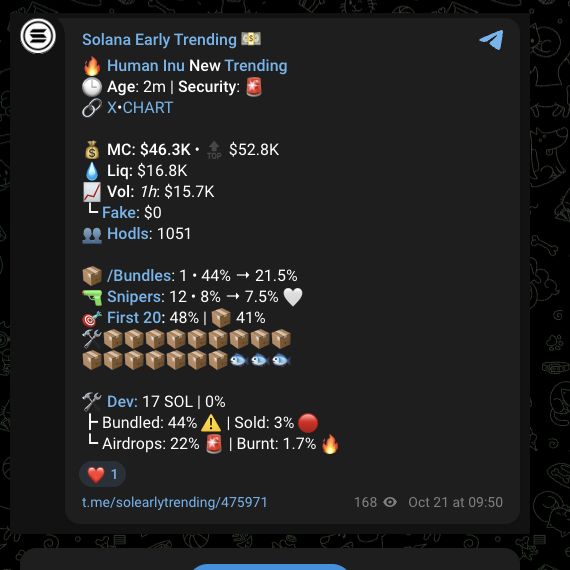
- Open the entry. Check the token identity, address or other identifying context, the post time and the visible fields.
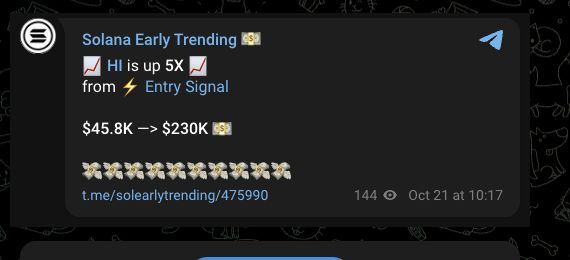
- Match a later update. Open Entry Signal. Confirm that it points to the same token and entry before you read the reported change.
- Read the comparison correctly. A reported multiple compares the feed's reference with the update's stated value. It is not your entry price or return.
- Run a fresh check. Choose Scan to open Scanner and inspect the token's current available context.
- Choose a separate next step. Keep researching, monitor through the relevant setup, discuss the lead or make your own trading decision. A feed post does not create an order.
If Entry Signal does not lead to a matching entry, do not compare the values. Return to the feed post, check the token identity and timestamp, then open Scan if you still want current research.
What each feed surfaces
| Feed | Starting activity | What to do with it |
|---|---|---|
| Early Trending | Early-token price and activity filters. | Check the entry and any later price update, then scan the token. |
| Whale Trending | Qualifying wallet buys. | Read whether the post is an Entry, Confluence or Accumulation signal, then check the token and wallet context. |
| Trench Trending | Short-window token activity with token-specific filters. | Check the entry and any later price update, then scan the token. |
Open the public channels: Early Trending, Whale Trending or Trench Trending. The guides below explain how to read each feed.
All three leaderboards use price alerts from the previous 24 hours, keep each token's highest reported multiple and list the largest first. Paid placements can be inserted separately. A position, paid placement, feed selection or reported change is not a safety rating, recommendation or forecast.
Use the visible controls
- Scan opens a fresh Scanner research flow for the token.
- Track on a Trending post opens the separate Sniper token-condition setup for that token. Opening it does not save a condition or create an order. Scanner's Trench Track route is separate.
- Buy begins a separate trading flow. Check the token, wallet, amount and prompt before authorizing anything.
Continue from the right product
Use Early Trending, Whale Trending or Trench Trending when you need that feed's details. Use Scanner for a current audit. Use Trench Track for Scanner's separate per-token condition route, or Soul Sniper only after deciding to trade.
Soul Terminal lets you browse the feed families and open token research on the web. For shared research, include the post link and time in your community discussion.
Information is provided for informational purposes and may contain paid promotions. See the Trending disclaimer.
© 2023-Present Soul Systems LLC. All rights reserved.