Skip to documentation content
Soul Terminal

Documentation

⌘ / Ctrl K
Open Terminal

Start here

  • Introduction
  • Products and features

Soul Terminal

  • Feeds, scans and charts

Soul Scanner

  • Scanner overview
  • Scanner guide
    • Start a scan
    • Alerts and warnings
    • Field glossary
    • Fake Holder
    • Fake Volume
    • Bundles
    • Snipers
    • First 20
    • Group Trading
    • Auto Track
    • Trench Track

Soul Trending

  • Soul Trending
    • Early Trending
    • Whale Trending
    • Trench Trending

Soul Sniper

  • Trade with Sniper
    • Limit and auto orders
    • Tracking-linked orders

Share and get help

  • Community
  • Contact
  • Team

Understand limits

  • Terms
  • Disclaimers
    • Trending disclaimer
  • Privacy policies

Interactive guides

  • Interactive Soul guides
    • Interactive Scanner scan guide
    • Soul Scanner command guide
    • Soul Sniper command guide
    • Soul Trending guides
      • Trending basics: What Trending is
        • Trending basics: Recognize the posts
        • Trending basics: From alert to research
        • Trending basics: Your next step
      • Early Trending: Start with Early Trending
        • Early Trending: Read an entry alert
        • Early Trending: Read updates and rankings
        • Early Trending: Your next step
      • Whale Trending: Read the wallet signals
        • Whale Trending: Wallet and Scan
        • Whale Trending: Read updates
        • Whale Trending: Your next step
      • Trench Trending: Start with Trench Trending
        • Trench Trending: Read the entry fields
        • Trench Trending: Read updates
        • Trench Trending: Your next step

Start here

  • Introduction
  • Products and features

Soul Terminal

  • Feeds, scans and charts

Soul Scanner

  • Scanner overview
  • Scanner guide
    • Start a scan
    • Alerts and warnings
    • Field glossary
    • Fake Holder
    • Fake Volume
    • Bundles
    • Snipers
    • First 20
    • Group Trading
    • Auto Track
    • Trench Track

Soul Trending

  • Soul Trending
    • Early Trending
    • Whale Trending
    • Trench Trending

Soul Sniper

  • Trade with Sniper
    • Limit and auto orders
    • Tracking-linked orders

Share and get help

  • Community
  • Contact
  • Team

Understand limits

  • Terms
  • Disclaimers
    • Trending disclaimer
  • Privacy policies

Interactive guides

  • Interactive Soul guides
    • Interactive Scanner scan guide
    • Soul Scanner command guide
    • Soul Sniper command guide
    • Soul Trending guides
      • Trending basics: What Trending is
        • Trending basics: Recognize the posts
        • Trending basics: From alert to research
        • Trending basics: Your next step
      • Early Trending: Start with Early Trending
        • Early Trending: Read an entry alert
        • Early Trending: Read updates and rankings
        • Early Trending: Your next step
      • Whale Trending: Read the wallet signals
        • Whale Trending: Wallet and Scan
        • Whale Trending: Read updates
        • Whale Trending: Your next step
      • Trench Trending: Start with Trench Trending
        • Trench Trending: Read the entry fields
        • Trench Trending: Read updates
        • Trench Trending: Your next step

Overview

Products and Features

Choose Scanner, Trending, Terminal or Sniper for what you want to do next.

Choose the tool for what you need next. Soul connects discovery, token research, monitoring and trading, so you can follow a lead without committing to a trade.

Choose by the outcome you need

  • Scanner: Check a token's warnings, holders and activity, then monitor changes. Start a scan.
  • Trending: Find tokens through Early, Whale or Trench signals. Read an alert.
  • Terminal: Scroll live feeds on the web and open a token's scan and chart. Browse feeds.
  • Sniper: Buy or sell a chosen Solana token, or set an order. Trade with Sniper.
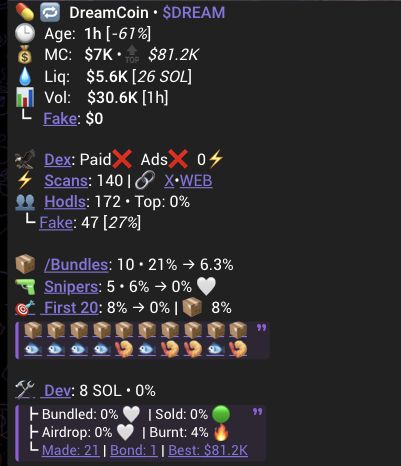
Scanner result with token identity, market fields, holder categories and early-buyer summaries.
Check the token and its context before choosing where to go next.

Soul Scanner

Check the token address, warnings and market activity. Open holder details, Bundles, Snipers or First 20 when you want to investigate a field. Use Auto Track for event categories and Trench Track for one token's condition. These Scanner guides cover Solana and Robinhood; a field available on one chain is not promised on the other. A scan is research, not a safety guarantee.

Soul Trending

Early Trending focuses on early-token activity, Whale Trending on qualifying wallet buys and Trench Trending on short-window token activity. Read the entry, scan the token, then follow any later update back to that entry. A leaderboard or paid placement is not a recommendation.
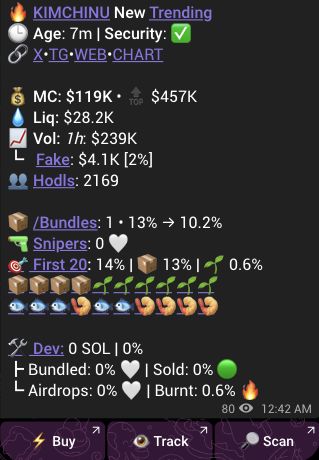
Early Trending entry with token identity, market context and Buy, Track and Scan controls.
Scan opens research. On a Trending post, Track opens the separate Sniper token-condition setup. Opening it does not save a condition or create an order; Buy starts a separate trading flow.

Soul Terminal

Scroll the same Trending feed families on the web. Switch between feeds, use tooltips to understand a row, then open the token page for its full scan and chart. Premium offers advanced discovery and audit features when they are available to your account. Use the feed and token views on desktop, tablet or mobile. Open Terminal or follow the feed-to-token guide.

Soul Sniper

Buy or sell in Telegram after checking the token, wallet, amount and fees. Use limit and auto orders for price-based exits, or tracking-linked orders for supported alert conditions. After saving, open the order and check its status: a saved order is not a completed trade. Trading links in Scanner can open Sniper.

Choose what happens next

You can stop, investigate elsewhere, monitor, share research or choose to trade. For paid placement inquiries, contact the commercial team to confirm current eligibility and terms. A payment or placement does not establish reach or a trading result.

© 2023-Present Soul Systems LLC. All rights reserved.

PreviousIntroductionNextSoul Terminal

On this page

  1. Choose by the outcome you need
  2. Soul Scanner
  3. Soul Trending
  4. Soul Terminal
  5. Soul Sniper
  6. Choose what happens next