Scanner fields help you turn a dense result into clear research questions. They show reported data when it is available, and their availability, calculation and display can differ by chain and source. A missing value is not zero.
Use these definitions while auditing a scan. Each term gives you a more specific question for Scanner or an independent reference. The glossary does not turn a field into a recommendation or execution instruction.
How to use this glossary
Start with the token address and chain. Read each term beside its value and source context. Use it to form a research question, not reach a verdict.
Open the matching field or its available detail view first. The same label can be absent, use a different display format, or carry a different scope in another chain or source context.
Terms
Identity and market context
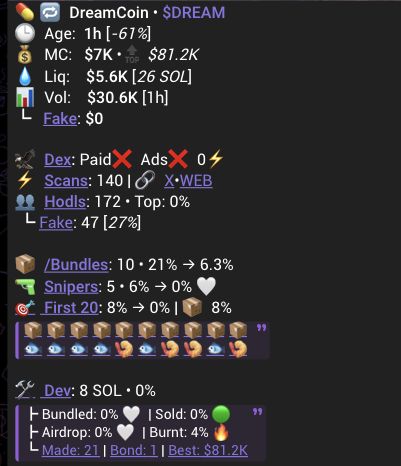
- Age is the displayed duration since the token launched.
- MC is the displayed market capitalization, or value of circulating token supply.
- Liq is displayed information about the token's liquidity pool. It does not by itself establish pool ownership, access or safety.
- Vol is reported USD trading volume for the result's stated time window. Price Change is reported price movement for its stated period.
- Scans is the displayed count of Scanner scans for the token. It does not measure holders, trades or token quality.
Supply, holders and activity
- Mint Auth means an authority can permit additional supply. Scanner separately shows when a detected authority matches the deployer. These are different things.
- LP Status is the reported state of the liquidity pool. Read it with returned liquidity context and Alerts and Warnings.
- Holders is the displayed count of token-holding addresses. Top Ten and individual-holder fields show reported supply concentration. They do not show shared ownership or intent.
- Fake Holder and Fake Volume are separate available detector measurements. See Fake Holder and Fake Volume for their limits.
- Bundles, First 20 and Snipers are separate activity summaries. They can support research but do not prove coordination, identity or a future outcome. See Bundles, First 20 and Snipers.
Deployer and research links
- Dev identifies the displayed deployer. Reported balances, token holdings and Airdrops show available wallet or transfer context. They do not show intent or control of every related address.
- Telegram, Twitter, Website, chart and explorer links are returned research destinations. They do not independently verify official ownership or their content.
Recovery and next step
If a term or field is unavailable, keep that uncertainty in mind. Use Alerts and Warnings for labels and the dedicated research guides for detail.