Read Snipers to understand the reported early-buyer group and its supply figures. Confirm the token and chain first. This explanation covers the Solana result shown below. Availability and presentation can vary by chain.
What it measures
In Snipers: N · B% → H%:
- N is the number of addresses reported in the sniper group.
- B% is the reported share of token supply bought by that group.
- H% is its reported holding share of token supply when the scan was prepared.
The arrow separates bought and holding figures. It does not show a price change, profit or the percentage of the original purchase still held. The percentages use supply figures supplied with the result and are rounded for display.
Bought and holding may use different supply figures and observation times. Read each as its own reported share.
Read all three fields from the same returned scan. Availability, coverage and update timing can vary. This activity summary is separate from Soul Sniper, the trading product.
What it cannot tell you
Snipers is a group label. It does not prove that an address belongs to a bot, identify a person, establish shared ownership or demonstrate coordination. The group can overlap other activity views; do not add their counts or percentages together as though they were separate populations.
An absent row or percentage is unavailable, not a reported zero. A displayed 0% does not prove that every address sold all its tokens. Rounding and incomplete holdings information can affect that reading.
The difference between bought and holding percentages is not a verified sales total. The row does not provide a complete transfer history, establish token safety or predict a price move.
One worked example
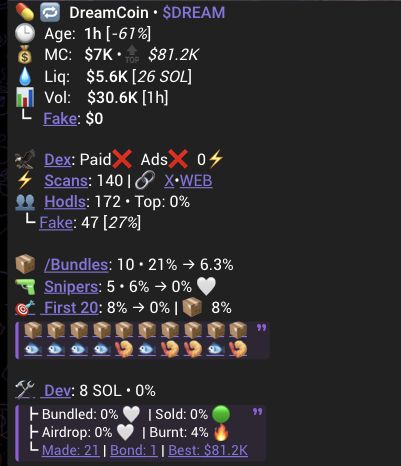
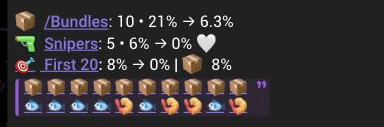
The capture shows Snipers: 5 · 6% → 0%.
Read this as: the result reports five sniper addresses, a bought figure of about 6% of supply, and a displayed holding figure of 0%. It does not mean five people or prove that those addresses sold exactly 6% of supply. The screenshot does not verify the underlying purchases or holdings.
Return to your original scan and read the count, bought figure and holding figure together. Keep any unavailable field unknown. For distinct activity context, see Bundles and First 20.