Soul Scanner gives new and experienced memecoin traders a practical way to inspect tokens in Telegram and watch for changes. It supports Solana and Robinhood chains. Fields can differ between chains and sources.
Use this page to move from a token address to a finding you can state with its limit and a sensible next step. Scanner helps with audit and monitoring. It does not execute a trade.
Token Information and Alerts
Start with a supported token address. Confirm the returned chain, token name and address before reading a finding. A scan is research, not a safety rating or trade recommendation.
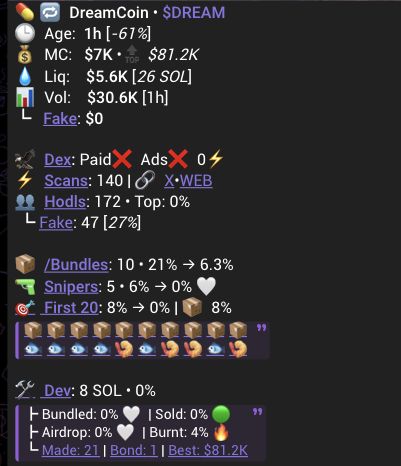
Read the result in order
- Confirm the asset identity and chain.
- Read market cap, liquidity and volume, then check warnings and wallet activity.
- Open an available field breakdown when you need more detail.
- Keep researching, set up monitoring, discuss the token, or open Sniper only if you separately decide to trade.
When a field has an information control or expanded view, open it before comparing its value. The short label may omit the source, time window or condition needed to read it.
No alert means this result did not display that label. It does not mean the token is safe. An unavailable or unknown field is not zero and does not prove the opposite condition. A displayed link is a destination, not evidence that it is official or that its content is correct.
Coin Information
Read field families together. One number rarely answers the whole question.
| Field family | What it helps you ask | What it does not establish |
|---|---|---|
| Identity and market: age, MC, liquidity, volume and price change | Is this the intended token, and what market context is available? | Safety, future price or a complete market picture. |
| Supply and holders: mint authority, LP status, holders and concentration | What supply or holder context is returned? | Ownership, intent or a complete holder population. |
| Activity: scans, bundles, First 20, Snipers and fake measurements | What activity or cohort summaries are available? | Coordination, human identity or a trade outcome. |
| Deployer and links: dev balances, holdings, airdrops, social and explorer links | What source or address should be checked next? | That a linked account is official or controls every related wallet. |
Available liquidity, market, holder, deployer and activity fields can vary by chain and source. Use the Glossary for definitions and the supporting guides for detail.
Deployer and Socials
Use available deployer and social fields as investigation prompts. They do not prove ownership, intent or safety. Compare an important claim with an independent reference.
Continue your research
Use Alerts and Warnings for a label; Bundles, First 20 or Snipers for activity context; Auto Track or Trench Track to monitor; and Soul Sniper for separate execution.