Read First 20 to understand the early-trader entries reported for a token. Confirm the token and chain first. This explanation covers the Solana result shown below. Availability and presentation can vary by chain.
What it measures
First 20 summarizes up to 20 early-trader entries available to the scan. It is not a count of all holders or all trades.
In First 20: B% → H%, B% is the reported share of token supply bought by those entries. H% is their reported holding share of token supply when the scan was prepared. The arrow separates bought and holding figures; it does not show a price change, profit or the percentage of the original purchase still held.
Bought and holding may use different supply figures and observation times. Read each as its own reported share.
Read both figures from the same returned result. The percentages use supply figures supplied with the scan and are rounded for display. Availability, coverage and update timing can vary.
Wallet map and category key
Each linked icon in the wallet map represents a reported address entry. Use this key to read its label:
| Icon and category | How to read it |
|---|---|
| 🛠 Dev | The token's reported deployer address. This does not identify every address associated with the project. |
| 🌱 Fresh | An address classified as a new wallet by the data source. The label alone does not establish who owns it. |
| 🍤 Shrimp | The lower SOL-balance bracket in the source's wallet classification. |
| 🐟 Fish | The middle SOL-balance bracket in that classification. |
| 🐳 Whale | The higher SOL-balance bracket in that classification. |
| 📦 Bundle | An entry classified as participating in bundle activity. The label does not prove that the entries share an owner. |
Shrimp, Fish and Whale describe SOL-balance classifications. They do not describe how much of this token an address bought, its profit, or its current token balance. Labels and availability can vary with the source and chain.
An accompanying category percentage describes the reported bought supply for entries with that label. It is part of the First 20 summary, not additional supply to add to the total. It is not a wallet count. The Bundle category is part of First 20; it is not the total from the separate Bundles view. A red dot (🔴) marks a category without a positive displayed bought share; it does not prove that every address sold.
Open the First 20 details
- Start from the token's Solana scan and tap the linked First 20 heading.
- Follow the link into Scanner's private chat. If Telegram offers Start, tap it to open the requested detail.
- Check the token symbol in First 20 Buyers on $TOKEN before reading the result. The detail request can fetch newer data than the original scan.
- Read Total Supply, the linked wallet icons and Categories together. Tap an individual wallet icon to open its address on Solscan.
The scan's First 20 link carries the token address into this detail action. Keep the original scan message available so you can return to it afterward.
The detail below is a separate HOPE result from the DREAM worked example later on this page. Read its fields only with the matching token result.

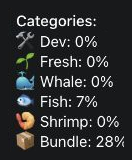
- Total Supply in this detail means the reported bought share for the returned First 20 entries. It does not mean total token supply or the percentage still held.
- Wallet icons link to address pages. The map's visual order is not a transaction timeline, and one address does not necessarily mean one person.
- Category rows break down the bought share by label. The captured
Fresh: 0%is a displayed supply figure, not a wallet count or proof that the source observed no Fresh buying. In this same response,Fish: 7%andBundle: 28%report bought supply assigned to those labels. They are not seven Fish wallets or 28 Bundle wallets. Use the six-category key above to interpret each label.
Read the holding figure from the main scan when available; the detailed category list is a bought-supply breakdown. Rounded category shares may not add exactly to the rounded total. A displayed category 0% does not establish complete records or prove that no buying occurred.
If the link or detail is unavailable, rescan the same token and use the fields that are available. A failed detail request is not zero buyers or zero supply. Return to the original scan before comparing another token.
What it cannot tell you
An entry or category does not identify a person, establish shared ownership or prove coordination. The map is not a list of every holder, and its visual order is not a transaction timeline. First 20 and other activity views can overlap; do not add their percentages together as separate populations.
An absent row or percentage is unavailable, not a reported zero. Holdings information can be incomplete. A displayed 0% does not prove that every entry sold all its tokens, and the difference between bought and holding figures is not a verified sales total.
The summary does not establish token safety or predict a price move. If an important conclusion depends on an individual wallet, check the available address and transaction information rather than relying on its label.
One worked example
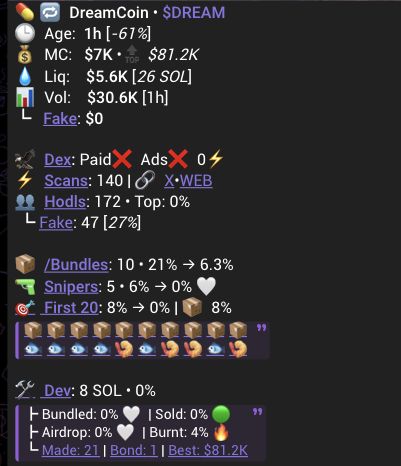
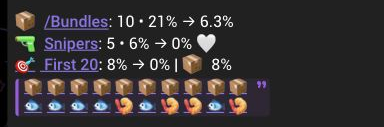
The capture shows First 20: 8% → 0%, followed by a Bundle category figure of 8% and the wallet map.
Read this as: the result reports a bought figure of about 8% of supply for its First 20 entries and a displayed holding figure of 0%. The category's 8% is part of the reported bought figure. Do not add them to make 16%.
This does not prove that 20 people bought, that every entry sold, or that exactly 8% of supply was sold. The screenshot does not verify the underlying purchases, balances or wallet labels.
Return to your original scan and read the bought and holding figures together. Keep unavailable fields unknown. For distinct activity context, see Bundles and Snipers.