# Trench Trending
Follow the activity, then check the token behind it. Use Trench Trending when you want to investigate a token surfaced by short-window activity and participation.
Trench Trending (TT) is a discovery feed. It evaluates short-window volume, scans and participant activity alongside token-specific filters. It is separate from Scanner Trench Track, which is a per-token condition flow, and from Sniper, which is a trading product.
The useful outcome is a token lead and a question for a current Scanner audit. TT does not configure tracking or execute a trade.
## Core flow
1. Open an entry post or the signal behind a leaderboard result.
2. Check the token identity, post time and visible research context.
3. If a price update exists, open **Entry Signal** and verify it returns to the same entry.
4. Read the reported change against the entry reference, not as your own return.
5. Choose **Scan** for a fresh Scanner audit, then decide whether to keep researching, monitor or stop.
If **Entry Signal** does not return to a matching entry, do not compare the values. Recheck the token identity and timestamp, then use **Scan** for current research.
## How Trench Trending differs
TT begins with short-window token activity and participation. That differs from Early Trending's early-token price and activity filters and Whale Trending's qualifying wallet buys. Its posts can include entries and price updates.
Leaderboards use price alerts from the previous 24 hours, keep each token's highest reported multiple and list the largest first. Paid placements can be inserted separately, so the list is not purely organic. A post, multiplier or rank is not a safety rating, recommendation or forecast.
## Track is a separate setup
**Track** on a Trending post opens the separate Sniper token-condition setup for that token. Opening it does not save a condition or create an order. Scanner's [Trench Track](/user-guides/soul-scanner/trench-track) route is separate. Use Scanner's route when you are setting a condition from a scan.
### [Open Trench Trending](https://t.me/+XoPEVcElMFcyMjhh)
Check current posts and timestamps. This guide does not promise a fixed posting interval or uninterrupted availability.
## Entry post example
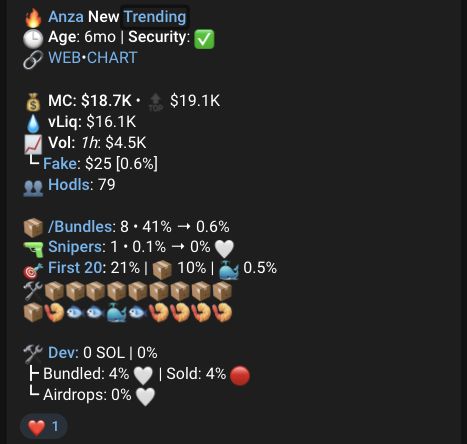 ANZA is the example entry linked by the update below. Scan opens a fresh token audit.
## Match the update to its entry
Open **Entry Signal** in the update to return to the original post. The ANZA update below links directly to the Anza entry. Both posts use the same token address. The $18.6K to $93.4K comparison is measured from the feed entry reference, not from a reader's trade.
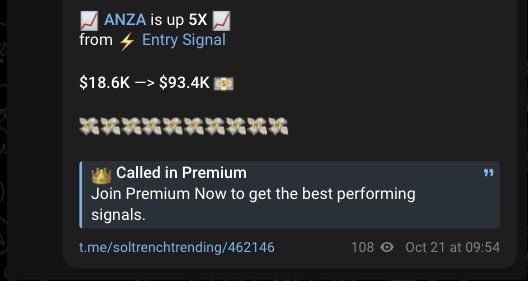 Open Entry Signal to verify the Anza entry, then Scan it to check current research context.
## Read the leaderboard in context
Open the underlying token signal before relying on a displayed rank. Paid placements can be inserted separately. The list is a recorded example, and its values do not establish a future outcome.
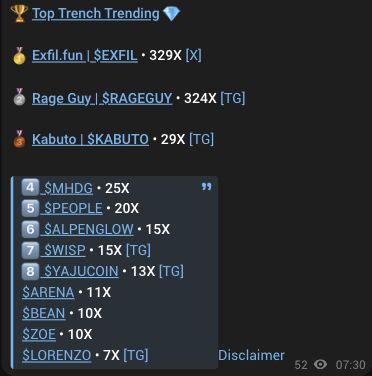 A rank is a research lead. Check the underlying signal and promotion context.
## Continue the research
Use [Scanner](/user-guides/soul-scanner/usage) to audit a token now. Use [Trench Track](/user-guides/soul-scanner/trench-track) only for Scanner's separate per-token condition route. If the entry and update do not match, stop there. A missing update does not prove that no activity occurred.
Compare [Early Trending](/user-guides/trending/early-trending) and [Whale Trending](/user-guides/trending/whale-trending), or continue research in [Soul Terminal](/user-guides/web). See the [Trending disclaimer](/support/disclaimers/trending).
© 2023-Present Soul Systems LLC. All rights reserved.