# Soul Scanner
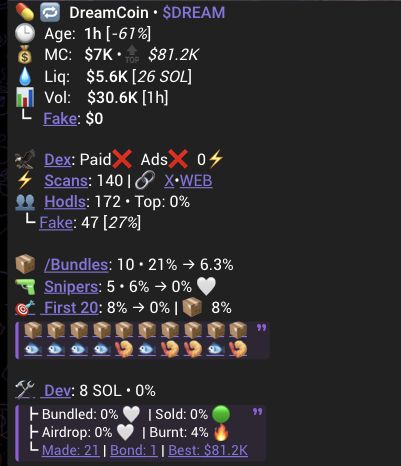
Soul Scanner gives new and experienced memecoin traders a practical way to inspect tokens in Telegram and watch for changes. It supports Solana and Robinhood chains. Fields can differ between chains and sources.
Use this page to move from a token address to a finding you can state with its limit and a sensible next step. Scanner helps with audit and monitoring. It does not execute a trade.
## Token Information and Alerts
Start with a supported token address. Confirm the returned chain, token name and address before reading a finding. A scan is research, not a safety rating or trade recommendation.
Confirm the token first, then read the available market, holder and wallet-activity fields.
### Read the result in order
1. Confirm the asset identity and chain.
2. Read market cap, liquidity and volume, then check warnings and wallet activity.
3. Open an available field breakdown when you need more detail.
4. Keep researching, set up monitoring, discuss the token, or open Sniper only if you separately decide to trade.
When a field has an information control or expanded view, open it before comparing its value. The short label may omit the source, time window or condition needed to read it.
No alert means this result did not display that label. It does not mean the token is safe. An unavailable or unknown field is not zero and does not prove the opposite condition. A displayed link is a destination, not evidence that it is official or that its content is correct.
## Coin Information
Read field families together. One number rarely answers the whole question.
| Field family | What it helps you ask | What it does not establish |
| ----------------------------------------------------------------------------------- | ----------------------------------------------------------------- | ------------------------------------------------------------------- |
| **Identity and market**: age, MC, liquidity, volume and price change | Is this the intended token, and what market context is available? | Safety, future price or a complete market picture. |
| **Supply and holders**: mint authority, LP status, holders and concentration | What supply or holder context is returned? | Ownership, intent or a complete holder population. |
| **Activity**: scans, bundles, First 20, Snipers and fake measurements | What activity or cohort summaries are available? | Coordination, human identity or a trade outcome. |
| **Deployer and links**: dev balances, holdings, airdrops, social and explorer links | What source or address should be checked next? | That a linked account is official or controls every related wallet. |
Available liquidity, market, holder, deployer and activity fields can vary by chain and source. Use the [Glossary](/user-guides/soul-scanner/glossary) for definitions and the supporting guides for detail.
## Deployer and Socials
Use available deployer and social fields as investigation prompts. They do not prove ownership, intent or safety. Compare an important claim with an independent reference.
## Continue your research
Use [Alerts and Warnings](/user-guides/soul-scanner/alerts-and-warnings) for a label; [Bundles](/user-guides/soul-scanner/bundles), [First 20](/user-guides/soul-scanner/first-20) or [Snipers](/user-guides/soul-scanner/snipers) for activity context; [Auto Track](/user-guides/soul-scanner/auto-track) or [Trench Track](/user-guides/soul-scanner/trench-track) to monitor; and [Soul Sniper](/user-guides/soul-sniper) for separate execution.
# Main Scan (proposed modern help)
This proposed Full help section describes a modern Scanner research design, not current deployed behavior. Start with the complete token address and treat each linked report as its own source response. `/Scans` opens Alpha Scans; `/First20`, `/Fake`, `/Snipers`, Holders, and Bundles each retain their own scope, snapshot, and availability.
### Illustrative static example
```text
Soul Scanner · $INU
CA: Bid8i1ocWssjRmKh2kcUfHxD1K6Sk7E5pV2PSVdepump
Mint disabled · Freeze disabled
Age: 2y [+1.2%] · MC: $266K · ATH: $1.2M · Liquidity: $84K
Volume: $45.1K [1h] · /Fake: No Fake Volume detected
/Scans: 435 · Holders: 1,232 · High Holders (>5%): 9.3% | 5.7%
Top Holders (10 | 20): 34.2% | 45.4% · Bundles: 26 · 61.2% → 6%
/Snipers: 42 · 8% → 1.7% · /First20: 40% → 8.4% | Fish 12% → 4%
Dev: 7 SOL | 0% $INU · Bundled: 12% | Sold: 13% · Airdrop: 0% | Burnt: 5%
Footer: Chart | Soul | Axm | Phtn | Bulx | Gm | Troj | Bonk | Mtro | Stb
Keyboard: Scanner Menu · Ape · Buy X · Alpha · Track · Help · Refresh Main Scan
```
Values and controls are illustrative. Help is a separate, rate-limited response; refresh replaces only after success, and failed refresh retains the last-good feature, token, and page.
## Scanner research menu
The proposed menu retains the token while choosing Main Scan, First 20, Fake Activity, Top Holders, Bundles, or Alpha Scans. Its controls are only those six same-token routes, separate Help, and Full help close/return. It has no menu-local refresh, pagination, preview, loading, denied, unavailable, empty, or interrupted-report state; those states belong to the selected reports where supported, and missing values must not be treated as zero.
```text
Scanner menu (illustrative proposed example)
CA: Bid8i1ocWssjRmKh2kcUfHxD1K6Sk7E5pV2PSVdepump
Research $INU
Footer: return to the same token
Keyboard: Main Scan · First 20 · Fake Activity · Top Holders · Bundles · Alpha Scans · Help
```
## Alpha Scans
Recorded Trending entries and scan activity may use different observation times and calculation bases. Missing feed values remain unavailable, while a recorded zero is distinct from a source failure. A feed multiple does not establish one synchronized current market cap.
```text
Alpha Scans (illustrative proposed example)
CA: Bid8i1ocWssjRmKh2kcUfHxD1K6Sk7E5pV2PSVdepump
Premium Trending | Trench Trending | 435 Scans · $INU | inu
Called in Premium
Premium Trending: Entered 23h ago · Entry MC $16.6K · Current 16x
Trench Trending: Entered 23h ago · Entry MC $16.6K · Current 16x
Early Trending: Entered 23h ago · Entry MC $43K · Current 7.2x
Whale Trending: Entered 23h ago · Entry MC $87.9K · Current 3.1x
Scans: 5min 0 | 1hr 4 | 24hr 435 · Degens: 184 · Groups: 97 | Members: 7395
Footer: Chart | Soul | Axm | Phtn | Bulx | Gm | Troj | Bonk | Mtro | Stb
Keyboard: Help · Refresh Alpha Scans · Main Scan
```